Record
Capture a route with GPS-enabled footage — a GoPro or a phone. The GPS track is what makes the road replayable.
 Account
Studio
You do not need Studio to walk, run, or ride. Film a road, then publish an indoor route or export a finished video with your metrics on it.
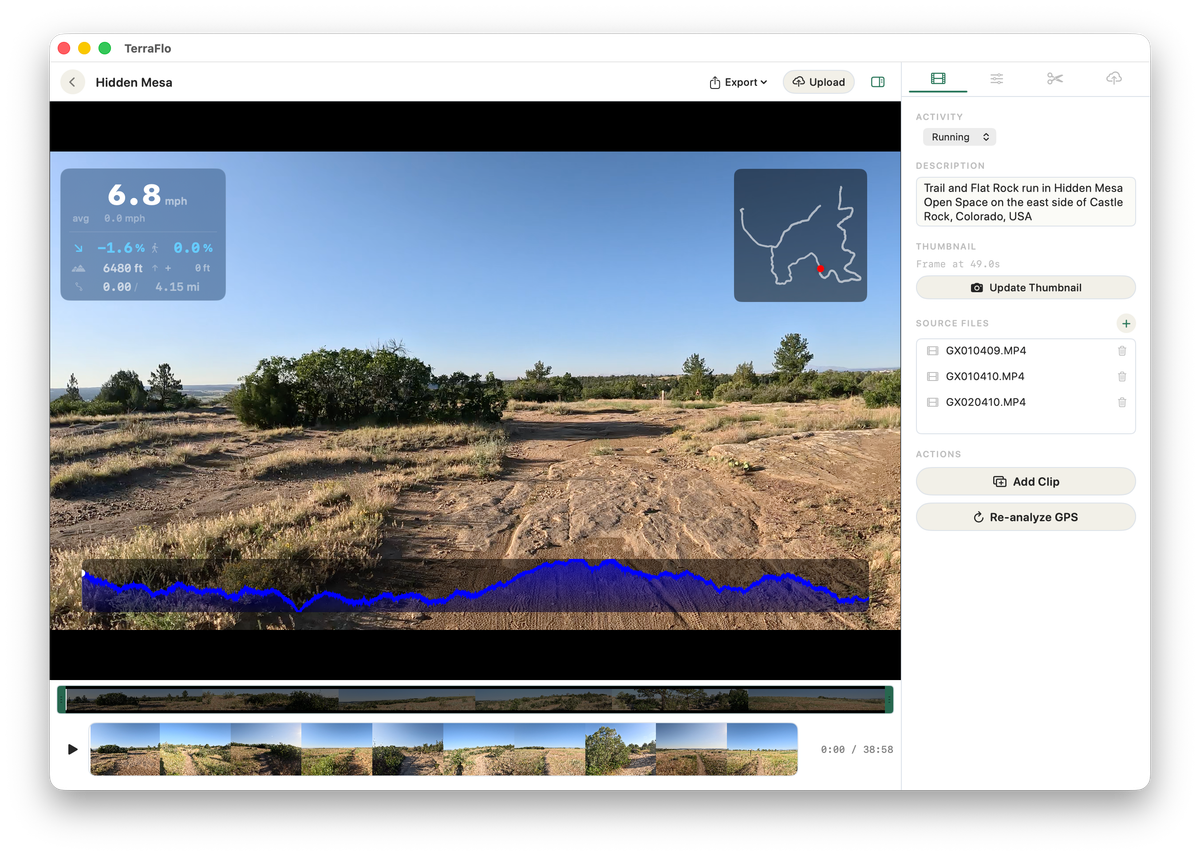
Record a road, align the footage to its GPS, then publish it or export an MP4.
Capture a route with GPS-enabled footage — a GoPro or a phone. The GPS track is what makes the road replayable.
Bring clips into Studio. Multi-clip rides are stitched and sorted automatically, and GPS gaps are flagged on the timeline.
Trim interruptions, heal stops, and preview overlays, minimap, elevation, and thumbnail exactly as they will export.
Turn the route into a TerraFlo session others can walk, run, or ride, once it has been reviewed.
Render a clean MP4 with your metrics baked in for sharing anywhere, when publishing is not the goal.
Publishing is only one path. Studio can also render your metrics, minimap, and elevation profile onto the footage and export a finished MP4 for sharing anywhere.
Studio's deepest editing tools live on macOS today, with creation and editing support rolling out by platform.
A published route can become a walk, run, or ride someone else can do indoors, once publishing is enabled and the route has been reviewed.
Skip publishing and render your ride, run, or walk with live metrics, minimap, and elevation overlaid. A finished MP4 for wherever you already share.
Published routes pass content review before they reach other people.